


Universal Remote TV for Roku
4.736.00 Reviews
App Specs
- Version
- 1.3.1
- Updated On
- License
- Free
- Downloads
- 10,000+
- Developer
- AxenGrid Labs
- Categories
- House & Home
- Platform
- Android
Screenshots
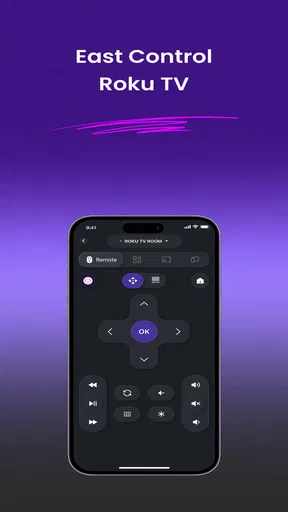
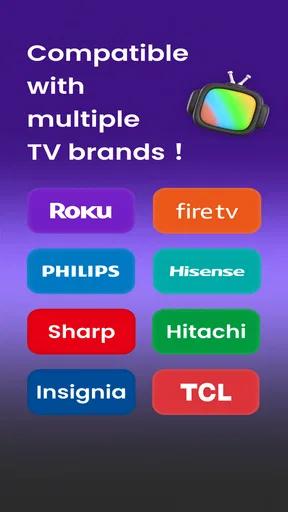
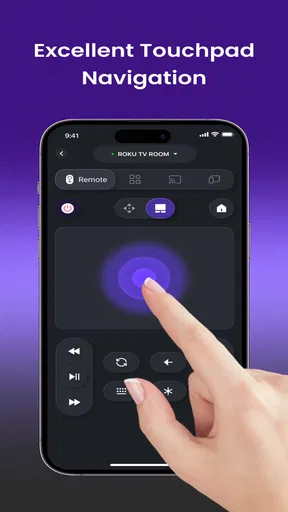
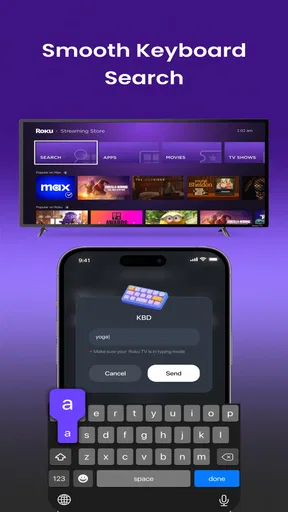
 Analysis by AppCompare
I like a TV remote best when it saves me from a small, familiar annoyance: hunting between sofa cushions or walking across the room to find the original. Universal Remote TV for Roku aims to solve that problem by turning an Android phone into a remote for compatible Roku TVs from brands including TCL, Hisense, Insignia, Hitachi, RCA, and Westinghouse. Its appeal is straightforward, but the useful question is whether a phone is a dependable substitute when you actually want to watch something.
One phone, several Roku TV brands
The app’s central capability is broad brand coverage within one specific kind of setup: Roku TVs from a range of manufacturers. That makes it more practical than keeping separate phone apps in mind for every TV brand, especially in a home where the living-room set and a bedroom set came from different makers. AxenGrid Labs developed it as a House & Home app, and the focus is clearly controlling a television rather than managing a whole smart home.
Universal Remote TV for Roku is most useful when the TV is compatible and your phone is nearby. Instead of treating the physical remote as the only way to interact with the set, you can reach for a device that is already in your hand. I find that idea especially appealing for quick adjustments: pausing while answering the door, lowering the volume during a phone call, or changing the channel without getting up.
That convenience should not be mistaken for universal compatibility with every television that happens to run Roku software. The named brands are a helpful starting point, but the actual TV model and setup matter. If you are considering the app for a particular set, check that it is a Roku TV from a supported brand rather than assuming that any Roku player or Roku-equipped screen will behave the same way.
What the phone-remote approach changes
A phone remote changes the routine more than it changes the television. The biggest gain is availability: you may already have your phone with you, while the remote is misplaced, out of reach, or being used by someone else. That matters in a shared room, where a spare way to control the TV can prevent a minor interruption from turning into a search around the house.
There is also a useful distinction between a backup and a replacement. I would treat this app as a convenient alternative for everyday commands, not assume that it makes the physical remote unnecessary in every situation. A phone depends on having the device close at hand and in working order. If it is charging in another room or its battery is nearly empty, the traditional remote remains the simpler choice.
How it fits into an ordinary evening
Picture settling down to watch a show and realizing the volume is too high after someone else has gone to bed. If the phone is already beside you, using it as the remote can be easier than getting up or searching for the original. The same logic applies when you want to pause briefly, make a quick adjustment, and continue without breaking the flow of what you were doing.
Worth Reading Before You Choose

EA SPORTS FC Mobile 26 Is a Bigger Football Game, but It Takes Time

Flipboard Shows What News Apps Must Do Beyond the Feed

Switching to Android Auto Means Rethinking Your Driving Routine

Google Calendar Makes a Crowded Week Easier to Manage

Ludo King Makes the Most of the Minutes Between Plans

Baby Panda World Brings Quick Play to Modern Phones, but Its Game Library Feels Busy
A less obvious use is keeping a fallback ready before the original remote goes missing. Rather than waiting until the TV is already on and you need a control immediately, you can check whether the app works with your set while the regular remote is still available. That gives you a chance to sort out compatibility at a calm moment instead of discovering a problem halfway through a film.
In a home with multiple televisions, the range of named TV brands may also be useful. Someone who has a TCL Roku TV in one room and a Hisense Roku TV in another may prefer trying one remote app rather than searching separately for brand-specific options. Still, I would verify each television on its own; support for one set should not be taken as proof that another model will connect in the same way.
For the first setup, I would keep the original remote within reach and allow a few minutes to test the app with the television you intend to use. Confirm that the phone can reach the set and that the controls you rely on respond as expected. Once that basic check is done, you can decide whether it is dependable enough for a regular backup or simply useful for occasional adjustments.
Where it sits among the usual alternatives
The obvious alternative is the TV’s original remote. That remains the most direct option because it is made for the set and does not require you to use your phone. If you watch for long stretches and want a dedicated control always available, the physical remote may feel more comfortable than unlocking and picking up a phone each time.
Another option is looking for a remote app tied to the television manufacturer. A brand-specific choice may be a better fit when you want an experience designed around one exact TV family, particularly if you already use that maker’s other services. This app’s advantage is its focus on Roku TVs across several listed brands, which can be convenient if your household is not loyal to just one manufacturer.
Universal Remote TV for Roku is different from a general smart-home controller, too. Its purpose is narrower, which is a benefit if your main need is controlling a compatible TV rather than collecting lights, speakers, and appliances in one interface. If your goal is broader home automation, a dedicated smart-home platform is likely the more sensible place to start.
The tradeoffs I would consider first
The first tradeoff is compatibility. A list of supported manufacturers narrows the search, but it does not remove the need to check the exact television. A brand can sell many models, and the name alone is not enough reason to expect every one to work. This is the main reason I would not uninstall a TV’s existing control option until I had tested the app with the set I own.
The second is convenience versus phone dependence. A phone remote is handy when the phone is already nearby, but it competes with everything else you use that device for. If you need to answer a message, take a call, or let someone else use your phone, the remote is no longer immediately available. For a shared family television, a physical remote may still be the least fussy option.
There can also be a small habit change. Picking up a phone and opening a remote app is not always faster than pressing a button on a nearby handset. I would expect the app to feel most worthwhile when the physical remote is absent or inconvenient, rather than when it is already sitting in your hand. That distinction keeps expectations realistic: the value is having another route to control the TV, not necessarily improving every interaction.
The app is free to install, with in-app purchases listed from $4.99 to $15.99 per item. I would start by checking whether the basic experience suits your TV before spending anything. The presence of purchases does not by itself tell you which functions require payment, so make your decision based on the options shown in the app rather than assuming that every control is included or that a purchase is necessary.
Who is most likely to benefit
I would recommend giving it a try if you have a Roku TV from one of the named brands, often misplace the remote, and usually keep your phone close by. It also makes sense for someone who wants a backup ready for a second room or for those moments when another person has the regular remote. These are modest needs, but they are exactly where a phone-based control can earn its place.
I would be more cautious if your TV is not clearly within the supported group, if you want a remote for a standalone Roku player rather than a Roku TV, or if a dedicated handset is essential to your routine. In those cases, checking the manufacturer’s own control options or sticking with the original remote may be more reliable than relying on an app whose compatibility you have not tested.
The app has a 4.7 average from around 1.6 thousand ratings, while its 10 thousand-plus installs suggest that it has found an audience without making it a household default. It is free to download, is rated for Everyone, and is currently at version 1.3.1. It was released on July 5, 2026, and requires Android 7.0 or later. Those details make it accessible to many Android users, though compatibility with the TV remains the more important practical check.
A useful backup, with a clear job
My view is that Universal Remote TV for Roku is worth considering when its specific strength matches your home: one phone-based control option for compatible Roku TVs from several familiar brands. It can make quick adjustments easier and save a search for the missing remote, but it does not erase the advantages of a dedicated handset or guarantee that every model will connect.
I would test it with the exact TV before depending on it, keep the original remote as a fallback, and judge its value by how often the phone is genuinely more convenient. For the right setup, that is enough. It is a practical spare control, not a reason to replace a working remote or a broader home-control system.
A small check that can prevent a frustrating first try
Before relying on the app during a show, I would test it at a time when nobody is waiting to use the television. Start with the TV you expect to control most often, keep its standard remote nearby, and try the basic actions you actually use rather than assuming that a connection alone settles the question. This makes it easier to tell whether the app is a useful backup for your routine or only an option worth opening occasionally.
If the phone does not seem to reach the set, I would first confirm that I selected the right kind of television and that the model belongs to the Roku TV setup the app is meant for. A standalone Roku player is a different case from a Roku TV, even if both are part of the same entertainment system. That distinction is a practical way to avoid confusing a compatibility issue with a fault in the phone.
When a shared household changes the calculation
For one person watching alone, a phone-based remote is mainly about convenience. In a shared home, it can also be about access: one person can keep the original remote while another uses a phone for a quick pause or volume change. But I would not make the phone the household’s only control. People may not want to hand over their personal device, and a guest or child may not have the app ready when they want to use the TV.
That makes the app most sensible as an extra route, not a universal answer to every remote problem. If the TV is in a room where several people watch together, leave the physical remote available and let the phone cover those moments when it is genuinely closer. In a bedroom or occasional-use room, where the original remote is easy to misplace, a tested phone option may be more valuable.
What to expect from a focused remote app
The narrow purpose is part of the appeal, but it also sets a boundary. I would choose this over a general home-control app only when the main task is a compatible Roku TV and I want a direct backup. If I needed to organize controls for several kinds of devices, I would look for a platform built around that wider job instead of expecting this app to become a complete household dashboard.
Likewise, someone who prefers tactile buttons, wants a control that can be passed around without unlocking a phone, or regularly watches while the phone is elsewhere is better served by the original remote. The app is a better match for a person who values having an alternative close at hand and is comfortable using a phone for simple television control.
My recommendation after weighing the fit
AxenGrid Labs has kept the idea focused: a free Android app for controlling compatible Roku TVs across several manufacturers, rather than a broad collection of home features. Its 36 written reviews sit alongside the larger rating total, but the useful decision is still personal: does your exact television work with it, and is your phone usually more accessible than the remote? Those are the questions I would answer before treating it as part of my regular setup.
For someone with a supported Roku TV who wants a spare way to pause, adjust volume, or avoid searching the cushions, I think it is worth trying. For someone who expects a phone to replace every physical control or needs to manage a different kind of Roku device, I would choose another option. Set it up with realistic expectations, keep the original remote until the app proves itself, and it can fill a useful, clearly defined gap.
Pros
- Quickly connects to Roku devices on the same Wi-Fi network.
- Offers a convenient on-screen touchpad for navigating menus.
- Includes playback controls for pausing and skipping content.
- Can be useful when the physical remote is misplaced or unavailable.
- Simple layout makes basic remote functions easy to find.
Cons
- Requires a working Wi-Fi connection to control the Roku device.
- May not detect Roku devices on guest or isolated networks.
- Some features may require an in-app purchase or subscription.
- Ads may interrupt use in the free version.
- Does not replace the physical remote for every setup or function.
FAQs for Universal Remote TV for Roku
What is Universal Remote TV for Roku, and what does it do?
Universal Remote TV for Roku is a mobile app designed to control compatible Roku streaming devices and Roku TVs from a phone. Depending on the app version and your setup, it may offer controls for navigation, playback, volume, and launching channels. It is an alternative to a physical remote, rather than a Roku device itself. Check the app listing for the exact features available on your Android or iOS device.
How do I connect the app to my Roku device?
In most cases, your phone and Roku need to be connected to the same Wi-Fi network so the app can find the device on your local network. Open the app, allow any requested local-network permissions, and select your Roku from the discovered devices. If it does not appear, check that the Roku is powered on, both devices use the same network, and your router is not isolating wireless devices.
Does Universal Remote TV for Roku work with every Roku TV and streaming player?
Compatibility can vary by Roku model, operating-system version, and the app’s current release, so it is best not to assume every device is supported. Some network or router configurations may also prevent discovery even when a Roku model is compatible. Before downloading, review the app’s store page for its stated requirements, and confirm that your particular Roku device is connected to your home network.
Can I use the app without Wi-Fi, or if I lose my Roku remote?
The app generally relies on a network connection between your phone and Roku, so it is not a universal offline replacement for a physical remote. If your Roku is not yet connected to Wi-Fi, or its saved network has changed, the phone app may be unable to find it. Some Roku TVs have physical controls that can help with basic setup; consult your model’s manual for available options.
Is Universal Remote TV for Roku free, and what should I know about privacy?
The app may be free to install while offering optional purchases, subscriptions, advertising, or feature limits; pricing and terms can change, so check the current store listing before downloading. It may also request permissions needed for device discovery or app functions. Review the developer’s privacy disclosures and permission prompts, and avoid entering Roku account credentials unless a clearly explained feature genuinely requires them.


